VB6 Vibes: Real Windows Forms in jdBasic
Do you remember Visual Basic 6? You dropped a button on a form, double-clicked it, wrote three lines of code and pressed F5. And you had a real Windows program. Not a web page pretending to be one.
I wanted that feeling back. So jdBasic got a native forms toolbox.
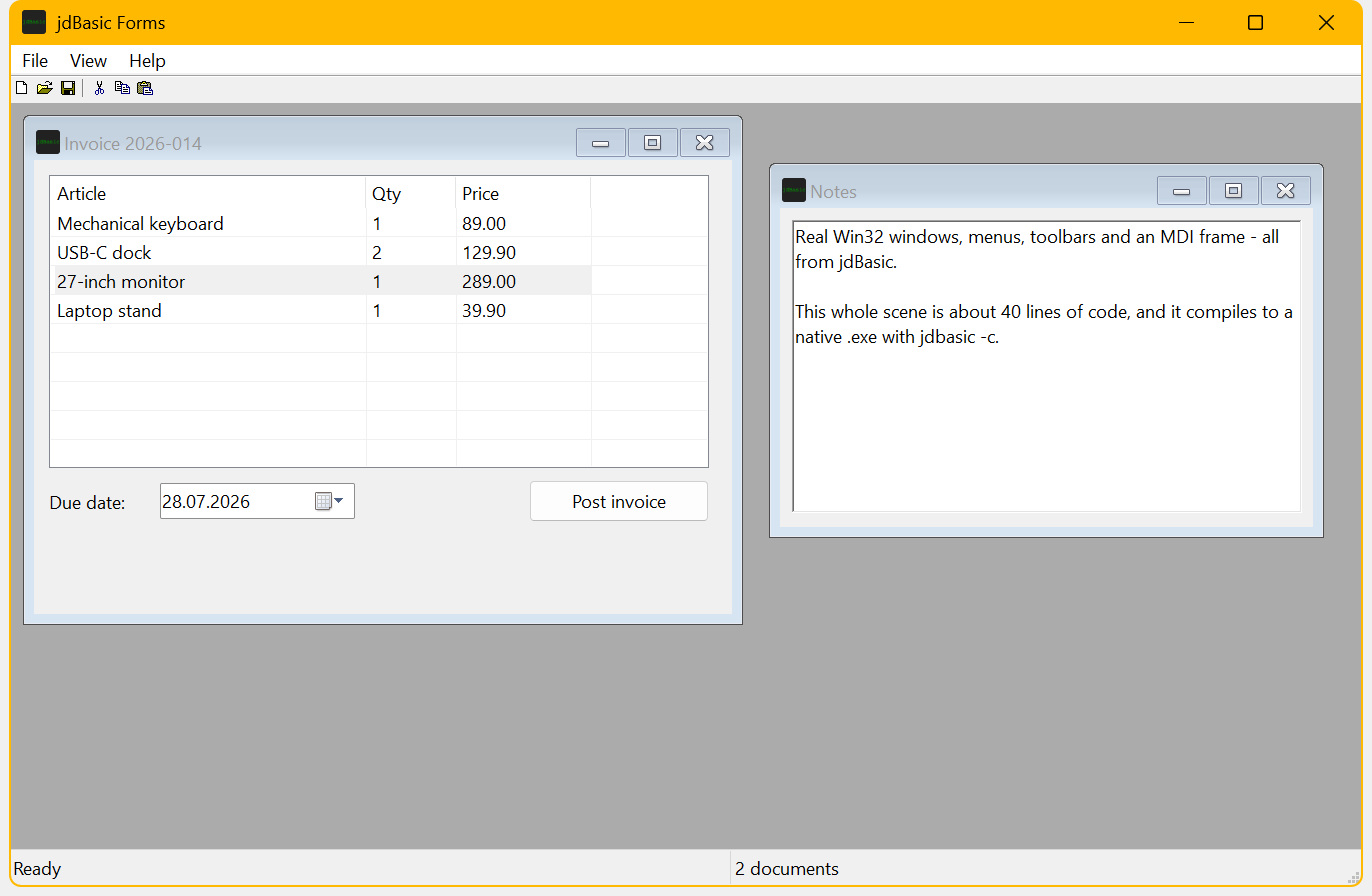
Everything in that screenshot is a real Win32 control. No immediate mode canvas, no embedded browser. An MDI frame with a menu bar and keyboard accelerators, a toolbar with the classic stock icons, a status bar with panels, a report ListView with grid lines, a date picker and a rich text box. The whole scene is about forty lines of jdBasic.
Hello, window
The API follows the old Visual Basic instincts. Controls have names, and events find their handlers by name. A one-parameter SUB called <control>_<event> is bound automatically. No wiring, no registration:
frm = FORM.CREATE("Hello", 320, 200, "MAIN")
btn = FORM.BUTTON(frm, "btnGo", "&Go", 110, 80, 100, 28)

SUB BTNGO_CLICK(e)
    MSGBOX("It really is that simple.", 64, "Hello")
ENDSUB

FORM.RUN(frm)
The toolbox is complete in the classic sense: Label, TextBox, Button, CheckBox, Radio, Frame, ListBox, ComboBox, Timer, Line, Shape, PictureBox, ProgressBar, Slider, UpDown, ListView, TreeView, Tabs, DateTimePicker and RichText. Plus menus with real accelerator keys, toolbars, status bars, MDI child windows and the four common dialogs: FILEOPEN$, FILESAVE$, COLORDIALOG and FONTDIALOG$.
Layout coordinates are DPI independent logical units. A form designed at 100% scale looks right on a 150% display.
The form is a file
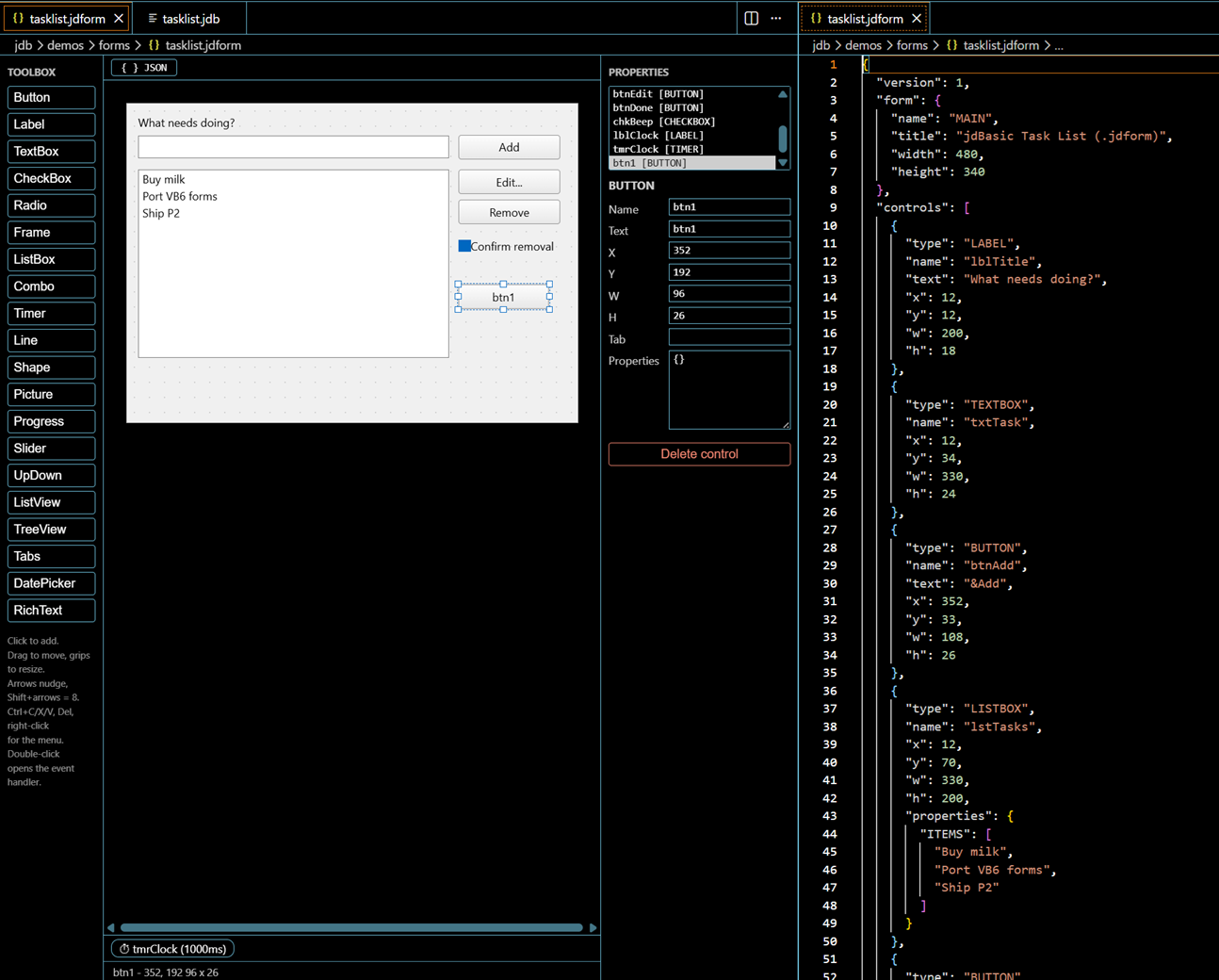
Layouts can also live in a .jdform file. That is a small JSON document describing the form, its controls and their properties. FORM.LOAD("main.jdform") builds the whole thing and binds every handler it finds in your program.
And because a layout file is exactly what a designer wants to edit, the jdBasic VS Code extension now ships a visual form designer. Toolbox on the left, canvas with drag, resize and grid snap in the middle, property grid on the right. Double-clicking a control jumps to its event handler in the code-behind file, or creates the stub if it does not exist yet. The JSON stays the single source of truth, so the text view and the canvas never fight. You can even keep both open side by side and watch them follow each other:
And yes, it compiles
Here is the part VB6 never delivered: the same source runs in the interpreter and compiles to a standalone native executable with jdbasic -c. The compiled binary uses the same event dispatch, the same layout scaling and the same visual styles. Forms, menus, grids, all of it, in a few megabytes of .exe plus the runtime DLL.
The gallery demo with every control on three tab pages is jdb/demos/forms/gallery.jdb in the repo. The MDI demo from the screenshot above is jdb/demos/forms/mdi_demo.jdb. And jdBasic itself lives at jdbasic.org, where you can try the language in your browser.